WaveFlow – Offline Music
- 3.9
- Rating
- 5.00M
- Installs
- Free
- Price

 Analysis by App-foxy
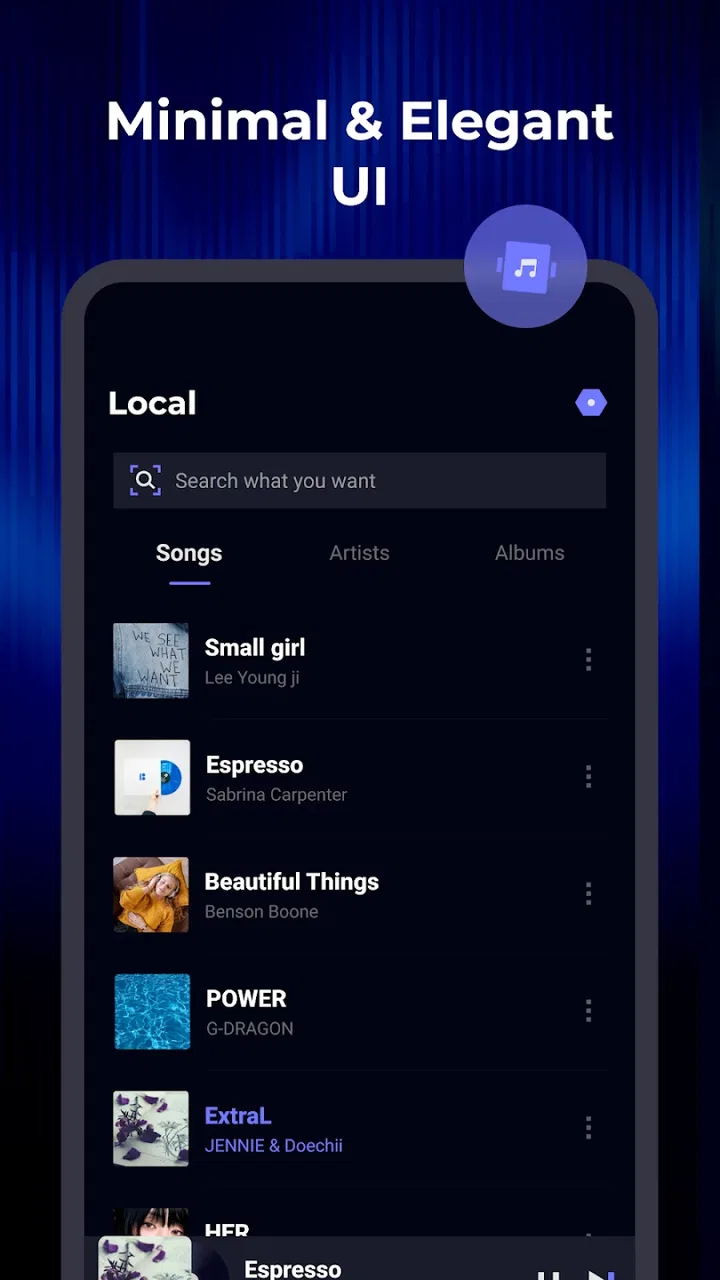
I tend to judge a music player by one question: does it make listening to music already stored on my phone feel simple? WaveFlow – Offline Music takes that focused approach. It is a free Music & Audio app from SmarTtDev, built around playing local tracks without making streaming the center of the experience. After spending time with it, I found its strongest quality is not a long list of extras, but the way an offline library can become the main event.
That focus matters if you regularly listen in places with weak reception, want to avoid using mobile data, or simply prefer music files that you control. WaveFlow is available for Everyone and works on Android devices running version 6.0 or later. Its current version is 1.2.2, and the app has already passed five million installs with a four-point average from roughly four thousand six hundred ratings. Those figures suggest it has reached a broad audience, but my experience is more useful than popularity here: this is an app for people who want a straightforward local player rather than another service trying to keep them online.
Offline playback is the real reason to use WaveFlow
The defining capability is offline music playback. That sounds ordinary, yet it changes the way I use a phone. Instead of opening a streaming catalog, waiting for a connection, and hoping a saved album remains available, I can work with the audio files already on the device. The result feels more predictable. A song is either in my library or it is not; there is no separate question about connectivity, account access, or whether an online service has changed its catalog.
You May Also Like

 Blood Strike: 2.5 Anniversary
Blood Strike’s Loadouts Turn Every Drop Into a Tactical Gamble
A close look at Blood Strike’s custom loadouts: how fast access to signature weapons reshapes its battle royale rhythm, rewards preparation, and narrows the gap between fights.

 Pandora - Music & Podcasts
Pandora’s Music Is Easy to Start, but Harder to Recover
Pandora’s strength is its low-effort path from a seed to a station. Its weak spot is how much confidence it asks you to place in connection, setup, and quiet recovery.

 8 Ball Pool
 Is Built on Rivalries, Rematches, and Routine
A close look at the rivalries, rematches, shared routines, and unanswered safety questions that turn a quick pool match into a persistent mobile community.

 Samsung Music
’s Quiet Strength Is Playing What You Already Own
Its reach comes less from spectacle than from dependable access to a personal library. That simplicity is both the app’s strongest retention engine and its ceiling.

 AccuWeather: Weather Radar
AccuWeather Review: A Quick, Clear Forecast for Everyday Decisions
For everyday plans, the best forecast is the one you can understand quickly. AccuWeather makes rain timing, radar, and local conditions easy to act on, with a few trade-offs.

 Hill Climb Racing
Why Hill Climb Racing Still Turns Crashes Into One More Run
A tiny car, a bumpy hill and one more upgrade: Hill Climb Racing keeps resurfacing because its simple chaos makes every near-miss feel personal.
More From Our News Desk



The practical strength of WaveFlow is control over the listening moment. When I start music from a local collection, I am not depending on a signal or on a service continuing to carry a particular track. That is especially useful during travel, in underground spaces, on flights, or in parts of a building where reception drops. It also suits people who have digitized older albums, bought music from different sources, or keep personal recordings that would never appear in a streaming catalog.
I would not describe this as a replacement for a streaming subscription in every situation. Streaming services are better when I want to discover unfamiliar artists, search a huge catalog, follow editorial playlists, or move between devices through a cloud account. WaveFlow’s value begins after the music is already on the phone. It removes the online layer instead of trying to compete with it.
What offline listening changes during an ordinary day
Imagine a commute through areas where reception comes and goes. With a streaming app, I might have to download an album beforehand, remember which playlists are available offline, and accept that some tracks may behave differently from ordinary local files. With WaveFlow, the useful preparation is simpler: keep the music on the device, open the player, and listen. That reduction in steps is small, but it is exactly the sort of convenience I notice repeatedly.
The same applies to exercise. If I want music while walking or training, I do not need to keep a connection active just to hear a familiar collection. That can make a phone feel less busy and reduce the temptation to browse while listening. WaveFlow is at its best when the goal is not to search endlessly, but to press play and leave the screen alone.
There is also a personal-archive advantage. Local files can represent albums, live recordings, language lessons, family recordings, or mixes assembled outside a commercial platform. A streaming app may handle mainstream music more elegantly, but it is not always the natural home for those files. WaveFlow gives that material a dedicated listening space.
How the app fits into a local music workflow
The most important part of using an offline player happens before playback: organizing the files. WaveFlow cannot make a disordered folder collection feel magically curated. If track names, album information, or artist details are inconsistent, the library may require some patience. I found that the best results come from treating the phone’s music folder as a small collection rather than a dumping ground.
Before relying on the app for a trip, I would check the library in advance. Confirm that the albums I want are stored locally, remove duplicate files, and make sure the phone has enough free space for the collection. This is a more dependable routine than discovering at the station or airport that a favorite album was never downloaded. It is also one of the less obvious trade-offs of offline listening: reliability shifts from the network to the quality of your preparation.
WaveFlow’s appeal is strongest when I already understand where my music comes from. Someone who transfers albums to a phone, keeps a collection of purchased files, or maintains recordings will probably settle into it quickly. Someone who expects an app to supply music automatically may find the first step less exciting, because the player is not the same thing as a catalog.
Another useful habit is to keep a smaller “daily” collection on the device instead of copying everything at once. A compact library is easier to browse and makes the offline purpose clearer. I would reserve space for the albums I actually replay, then refresh that selection occasionally. This approach avoids turning WaveFlow into a crowded archive where finding one track takes longer than starting a streaming playlist.
The best everyday scenario: a dependable travel library
For me, the clearest use case is travel. Before leaving, I would prepare a selection of albums and personal recordings, check them while still connected to Wi-Fi, and then use WaveFlow during the journey. The benefit is not only avoiding data use. It is the confidence that music will continue through a tunnel, a remote road, or a crowded terminal where a connection is unreliable.
This workflow is also helpful for people who share a phone with limited data, use an older device, or prefer not to keep several online services active. Since WaveFlow is free, it is easy to try without adding another subscription decision. The Everyone age rating also makes it a broadly accessible choice for a household, although the suitability of the music itself naturally depends on what each person stores on the device.
I would use it similarly for study or focused work. A preselected set of instrumental tracks can stay available without notifications from a music service inviting me to explore something else. That is not a special productivity system; it is simply the result of using a player that does not require a constant catalog connection. For some listeners, that narrower experience is a benefit rather than a limitation.
Where the experience can feel less convenient
The offline-first design has clear boundaries. If I want a new release immediately, I still have to obtain the audio file and place it on the phone through whatever method I normally use. WaveFlow does not remove that preparation. Likewise, if my listening habits depend on recommendations, social sharing, podcasts, radio-style discovery, or a synchronized library across several devices, a mainstream streaming app will usually feel more complete.
Local playback can also expose the untidy side of a music collection. Poorly named files and incomplete album information make browsing less pleasant, and an offline player cannot solve every organizational problem at the source. I would not choose WaveFlow expecting it to repair years of inconsistent folders. Its job is to play what I have, not to act as a full music-management service.
There is a second trade-off involving storage. Keeping music locally takes room, particularly when the collection contains many albums or higher-quality files. Streaming moves much of that storage burden elsewhere, while WaveFlow makes the phone’s available space part of the decision. For a modest collection this is easy to manage; for a very large archive, I would think about which albums genuinely need to travel with me.
Offline playback can also be less flexible when I change devices. A streaming account may make a library available after signing in, whereas local files generally need to be transferred or copied again. That does not make WaveFlow a poor choice, but it means I would include music migration in a phone-upgrade plan instead of assuming the library will follow automatically.
How it compares with the usual alternatives
Compared with a streaming service, WaveFlow is quieter and narrower. A streaming app wins for discovery, broad search, curated playlists, and access to music that is not already stored locally. WaveFlow wins when I value predictable playback, personal files, and independence from a network. The right choice depends on whether my problem is “what should I listen to?” or “how can I play my own music without interruptions?”
Compared with a manufacturer’s built-in music player, WaveFlow’s main attraction is that it gives the offline purpose a dedicated home. The difference may be subtle if the phone’s default player already handles local albums well. In that case, installing another app only makes sense if WaveFlow’s presentation or handling of the library feels better in daily use. I would test it with the actual collection rather than choosing based on the name alone.
Compared with more elaborate third-party players, the appeal here is restraint. Advanced listeners may prefer a tool centered on extensive audio controls, deep tagging, or highly specialized playback options. WaveFlow is easier to recommend to someone who wants a clean route from stored file to song, but I would point enthusiasts with demanding technical workflows toward a more specialized alternative.
Small habits that make WaveFlow more useful
My first tip is to test the exact travel or workout collection before leaving home. Turn off the connection temporarily and play several tracks from different albums. This catches missing files and reveals whether the library is arranged in a way that makes sense when I am in a hurry. It is a simple check, but it prevents the most frustrating kind of offline failure: discovering the problem only when there is no practical way to fix it.
My second tip is to separate permanent favorites from temporary listening. A small group of reliable albums can remain on the phone, while seasonal or trip-specific music can be added and removed later. That keeps storage under control and makes browsing faster. It also turns local music into something I can curate intentionally instead of a collection that grows without structure.
My third tip is to use WaveFlow as the offline half of a broader setup rather than forcing it to replace every music tool. I can discover music through a streaming service, purchase or otherwise obtain the files I want to keep, and then use WaveFlow when I need dependable local playback. This division of labor makes more sense to me than expecting one app to be excellent at both discovery and personal-file playback.
A fourth consideration is device maintenance. If the phone is reset, replaced, or heavily cleaned, local music should be included in the backup and transfer routine. The player can be ready, but it cannot help if the files disappear. For listeners whose music collection matters, keeping an additional copy elsewhere is sensible. That is not a flaw unique to WaveFlow; it is part of choosing local storage over a cloud-centered library.
Who benefits most from this focused player
WaveFlow is a strong fit for listeners who already have music files and want a free, uncomplicated way to play them offline. It makes particular sense for commuters, travelers, people with limited connectivity, owners of personal recordings, and anyone tired of turning a familiar album into a network-dependent activity. It is also a reasonable option for an older Android phone because the minimum requirement is Android 6.0 or later.
I would be more cautious if my main pleasure comes from discovering music inside an app. If I need synchronized listening across several devices, a large online catalog, podcasts, collaborative playlists, or constant recommendations, a streaming platform is likely the better primary tool. WaveFlow can still complement that setup, but I would not expect it to provide the same ecosystem.
The app’s reception is encouraging: it has more than five million installs and an average rating of four points from about four thousand six hundred ratings, while ninety-five written reviews offer additional user feedback to browse. I see those figures as a reason to consider it, not as proof that every library will feel perfect. Offline players are highly dependent on how each person stores and labels music.
My final view after using it
WaveFlow – Offline Music succeeds because it stays close to a clear purpose. It gives local music a simple route to playback and makes the absence of an internet connection feel like a normal condition rather than a problem. I appreciate that focus, especially when I want familiar tracks during travel, exercise, or quiet work without browsing a service.
Its limitations are equally clear. It does not replace the discovery, synchronization, and catalog depth of streaming, and it asks me to take responsibility for file organization, storage, and backups. Those are fair trade-offs if my priority is dependable offline listening.
I would recommend WaveFlow to a friend who owns the music they want to hear and values reliability over endless choice. If that describes you, the free installation makes it easy to test with your own collection. If your music life begins with online search and recommendations, keep your usual streaming app as the main player and consider this one only as a practical companion for local files.
For its intended audience, WaveFlow is not trying to be everything. That is precisely why it can be useful: it turns stored music into a dependable, everyday listening library without asking the listener to stay connected.
FAQs for WaveFlow – Offline Music
01What is WaveFlow – Offline Music, and how does it work?
WaveFlow – Offline Music is an app designed to enhance your music listening experience by allowing you to download and play your favorite tracks offline. The app boasts an intuitive user interface, making it easy to organize playlists, explore diverse music genres, and enjoy high-quality sound without the need for an internet connection.
02Is WaveFlow – Offline Music available for both Android and iOS?
Yes, WaveFlow – Offline Music is available for both Android and iOS platforms. You can download it from the Google Play Store for Android devices and the Apple App Store for iOS devices. This cross-platform availability ensures that a wide range of users can enjoy offline music without any hassle.
03Does WaveFlow – Offline Music offer any subscription services or in-app purchases?
WaveFlow – Offline Music offers a freemium model where you can access basic features for free. However, for an ad-free experience and additional features like unlimited downloads and exclusive playlists, you might consider subscribing to their premium service. In-app purchases are available to enhance your user experience.
04Can I import my existing music library into WaveFlow – Offline Music?
Yes, WaveFlow – Offline Music allows you to import your existing music library easily. The app supports various file formats, enabling you to sync your favorite tracks and playlists. This feature ensures that you can enjoy all your music in one place, without missing out on your preferred collections.
05Is WaveFlow – Offline Music safe to use, and how does it protect my data?
WaveFlow – Offline Music is committed to user privacy and data protection. The app does not require unnecessary permissions and employs robust encryption methods to safeguard your personal information. Regular updates and security patches are provided to ensure a secure and safe user experience.
Pros
- High-quality sound output for offline playback.
- User-friendly interface with intuitive controls.
- Equalizer with custom presets enhances audio.
- Supports multiple audio formats seamlessly.
- Ad-free experience ensures uninterrupted playback.
Cons
- Limited playlist management features.
- No lyrics support within the app.
- Lacks social sharing options for tracks.
- Requires manual file import for music library.
- No cloud sync for cross-device usage.

WaveFlow – Offline Music
Gallery